Firewall
An outgoing firewall for your Mac
Decide which apps can reach the internet. The first time an app tries to connect, Aegisrook stops it and asks, and your answer applies from then on.
30-day money-back guarantee. One licence for three Macs.
You choose what goes online
A rule for each app, made when it first matters.
Asked once, at the right moment
When an app connects for the first time, the alert names the app, the developer who signed it, and the server it's trying to reach. Allow it or block it, and Aegisrook remembers.
Once you've answered for an app, you aren't asked about it again, so the questions settle down after the first few days.
Rules as broad or narrow as you need
A rule can cover everything an app does, or one website, port or address. An app can be allowed to check for updates and nothing else, or blocked from one tracking server while the rest works normally.
Every rule is listed in one place, where you can change or remove it at any time.
Known bad servers blocked for every app
Turn on a blocklist and connections to known malware, phishing and scam servers are stopped, whichever app makes them. The default list holds about 200,000 servers from HaGeZi's Threat Intelligence Feeds and updates daily.
A second, optional list blocks advertising and tracking servers.
An ad blocklist can stop parts of some websites from working. You can allow a site again with one click.
See what was allowed and blocked
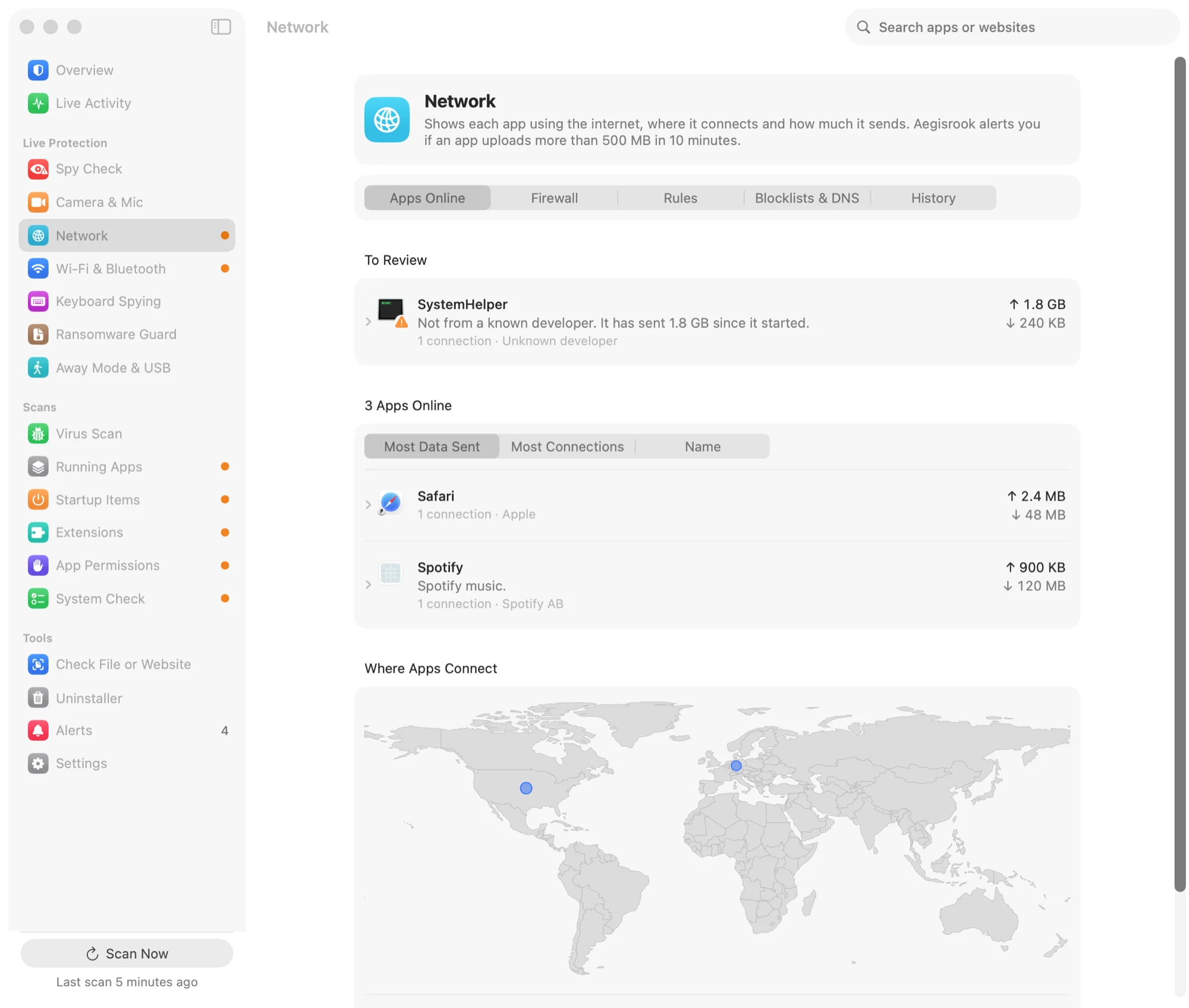
The Network page shows which apps are online, how much each one sends, and where their servers are. Blocked connections are listed separately, so you can check a rule is doing what you meant.
How it compares
macOS has a firewall already. It covers the other direction.
The macOS firewall
Found in System Settings, and worth turning on. It filters incoming connections only. It doesn't ask about, show or block what your apps send out.
Dedicated firewall apps
Apps such as Little Snitch and LuLu do the outgoing part, and some offer deeper network controls than Aegisrook. They don't cover startup items, permissions, the camera or ransomware.
Aegisrook
The outgoing firewall, blocklists and network history, together with the other checks in the same app, for one price.
Using another firewall already?
Two firewalls asking about the same connection gets confusing. You can leave Aegisrook's firewall off and use the rest of the app.
Limitations
A firewall controls connections. It doesn't make every connection safe.
Some Apple traffic
Parts of macOS don't pass through any third-party network filter, so Aegisrook can't see or block them.
Allowed apps
Once you allow an app, its connections go through. A firewall can't tell a good upload from a bad one inside an allowed app.
Blocklists are never complete
New malicious servers appear daily, and a list only knows the ones already reported.
Encrypted content
Aegisrook sees where a connection goes and how much it sends, not what is inside it.
Good to know
Needs approval once
macOS asks you to approve any app that filters network connections. The guide in the app shows which buttons to click.
Off by default
The firewall starts only when you turn it on, so nothing is blocked before you've set it up.
Nothing leaves your Mac
Rules and history stay on your Mac. Blocklists are downloaded; nothing about your connections is uploaded. See privacy.
Firewall questions
Does macOS have an outgoing firewall?
No. The firewall built into macOS, in System Settings › Network › Firewall, filters incoming connections only. To see or block what your apps send out, you need an app with an outgoing firewall, such as Aegisrook, LuLu or Little Snitch.
How do I block an app from the internet on a Mac?
Use an outgoing firewall and choose Block when the app first tries to connect. In Aegisrook, an app's first connection stops and asks: Block stops everything it sends, or you can block a single website and allow the rest. Every rule can be changed or removed later on the Network page.
Will Aegisrook ask me about every connection?
No, only the first time each app connects. Your answer is remembered, so the questions settle down after the first few days of normal use.
Can I use Aegisrook with Little Snitch or LuLu?
Yes, but run only one outgoing firewall. Two firewalls asking about the same connection gets confusing, so leave Aegisrook's firewall off and use the rest of the app.
Does an app firewall slow down my internet?
It shouldn't be noticeable. Aegisrook uses the network filter system extension macOS provides for this, and checks each connection as it opens rather than inspecting traffic continuously.
Decide which apps go online
Pay once and keep it for good.
Not for you? Get a full refund within 30 days.
30-day money-back guarantee. One licence for three Macs.