Ransomware Guard
Know fast if something starts encrypting your files
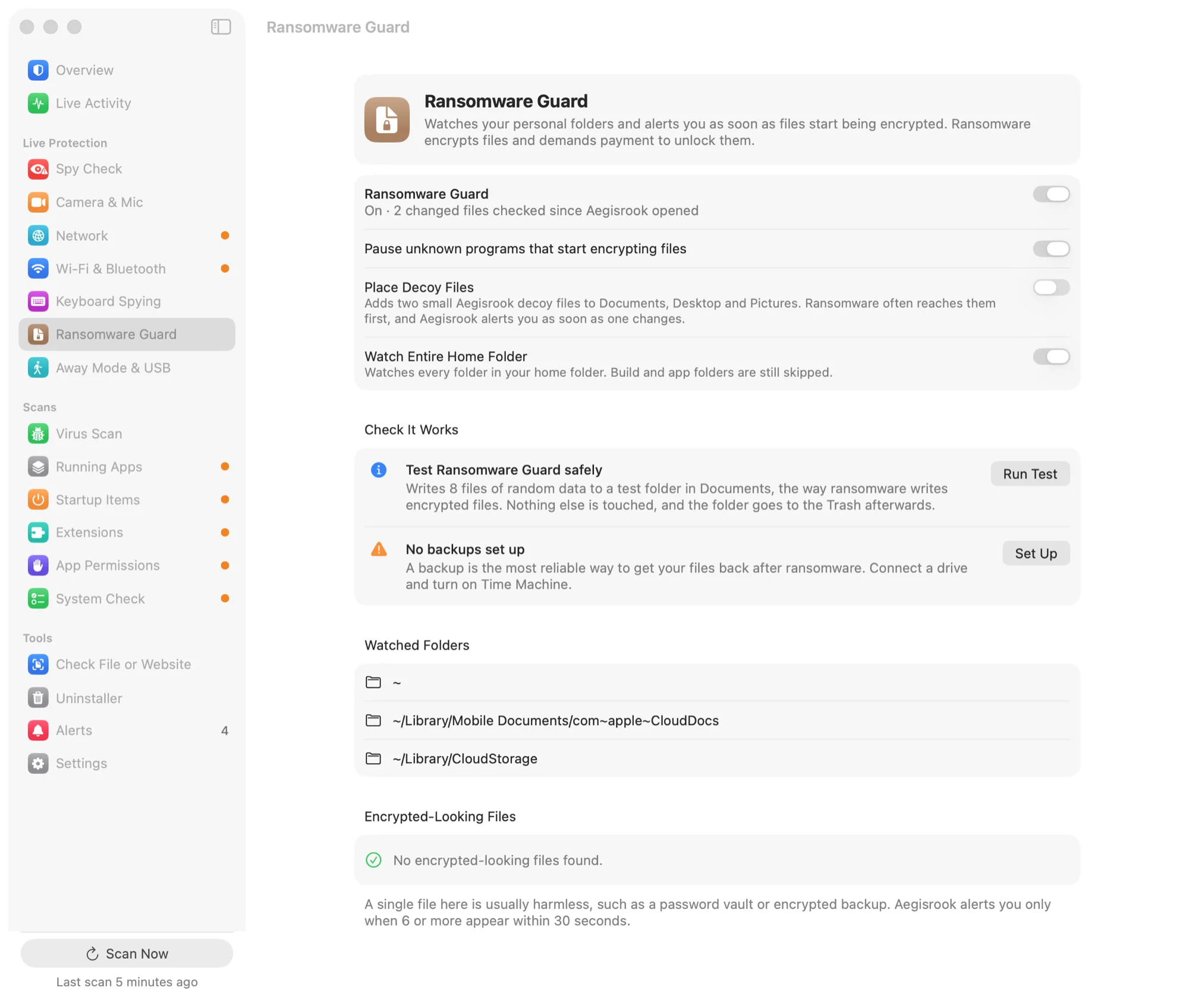
Ransomware Guard watches your personal folders for files being encrypted, warns you as soon as it starts, and can pause the program doing it.
30-day money-back guarantee. One licence for three Macs.
How it works
Ransomware has to rewrite your files. That's the moment it can be noticed.
Watches the folders that matter
Desktop, Documents, Downloads, Pictures, Movies and Music, plus iCloud Drive and other cloud folders. When files there are rewritten as encrypted data, Aegisrook notices, using the same kind of test as Objective-See's RansomWhere?.
Decoy files, if you want them
Turn on decoys and Aegisrook places a few files that no normal app has a reason to touch. If one of them changes, that's a strong sign of ransomware, and the alert says so.
Pauses the program doing it
If you choose, Aegisrook pauses the program it caught, so fewer files are affected while you decide what to do. Programs that are part of macOS are never paused.
Pausing slows an attack down. Files encrypted before the alert stay encrypted, which is why a backup still matters.
See it work on your Mac
The self-test writes a few harmless files the way ransomware would, in a test folder inside Documents. You see them caught, then the folder moves to the Trash. Nothing else is touched.
The same page shows whether Time Machine is backing up your Mac, and when it last did.
Limitations
This is an early warning, not a guarantee.
Some files may be encrypted first
Detection needs a few files to change. Those files aren't recovered by Aegisrook.
Folders it doesn't watch
Files outside the watched folders, and on external drives, aren't covered.
Apps that write encrypted files on purpose
Encryption tools and some backup apps can look similar. You can mark them as expected.
A backup is the real answer
Keep Time Machine or another backup running. This buys time; it doesn't replace one.
Good to know
Is ransomware a risk on a Mac?
It's much rarer than on Windows, but Mac ransomware exists, and the cost of losing your files is the same.
Light on your Mac
It reacts to file changes macOS reports, rather than scanning your folders over and over.
Nothing leaves your Mac
Your files are checked on your Mac and never uploaded. See privacy.
Ransomware questions
Can Macs get ransomware?
Yes, although it's far rarer than on Windows. The first known Mac ransomware, KeRanger, spread in 2016 through a hacked download of the Transmission app, and losing your files costs the same on any computer.
How does Aegisrook detect ransomware?
It watches your personal and cloud folders for files being rewritten as encrypted data, the same kind of test Objective-See's RansomWhere? uses. Optional decoy files add a second signal: no normal app has a reason to change them.
Will Aegisrook stop ransomware?
It's an early warning, not a guarantee. If you choose, it pauses the program it caught, which slows an attack, but files encrypted before the alert stay encrypted. A backup is what gets them back.
How can I safely test ransomware protection on my Mac?
Use Ransomware Guard's built-in test. It writes a few harmless files of random data to a test folder in Documents, the way ransomware writes encrypted files, shows that they were caught, then moves the folder to the Trash.
Do I still need Time Machine?
Yes. Keep Time Machine or another backup running; Aegisrook's Ransomware Guard page shows whether it is, and when it last backed up.
An early warning for your files
Pay once and keep it for good.
Not for you? Get a full refund within 30 days.
30-day money-back guarantee. One licence for three Macs.