Running apps and startup items
See everything that starts with your Mac
Every program set to start by itself, in one list, with who made it. When something new is added, you're told straight away and you decide whether it stays.
30-day money-back guarantee. One licence for three Macs.
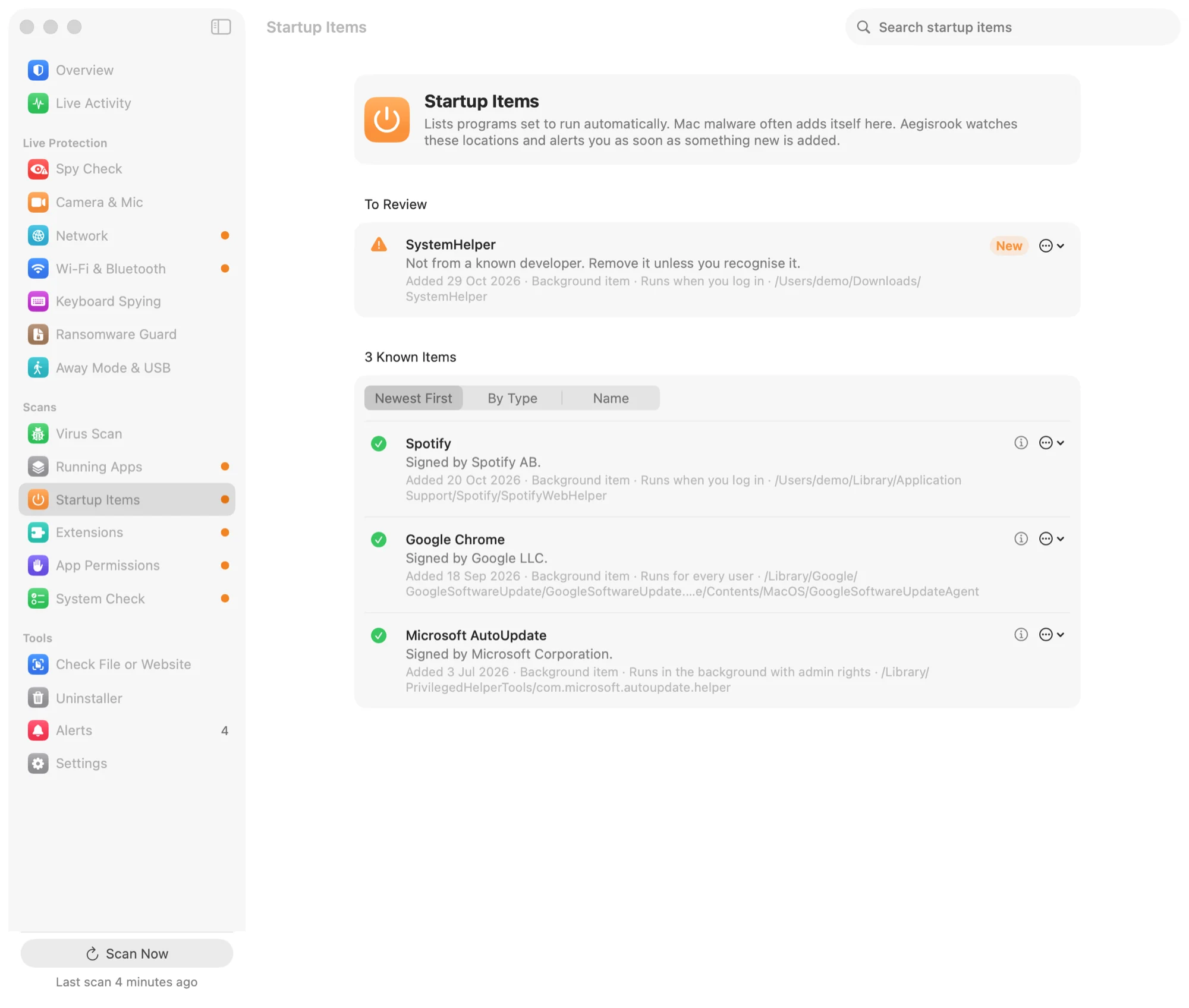
One list instead of eight places
Programs can set themselves to start in many places. Aegisrook reads them all.
Every kind of startup item
Login items and background items from System Settings, plus the places it doesn't show: launch agents and daemons, scheduled jobs, login hooks, login screen plugins, system plugins and shell startup files.
This matters because the hidden places are where most Mac malware sets itself to run again after a restart.
Who made each one
Each item shows the program it starts and the developer who signed it. Items from Apple and well-known developers are grouped together, so the few that aren't stand out.
Sort by newest first to see what was added recently, by type, or by name.
Told when something new appears
Aegisrook watches these places while it runs. When a new startup item is added, an alert names it, says who signed it, and lets you keep it or move it to the Trash.
Removing a startup item stops a program starting by itself. It doesn't uninstall the program. Everything goes to the Trash, so you can put it back.
Everything running right now
Running Apps lists every program running, grouped by who made it, with when it started. Programs from unknown developers are listed first, to review.
Limitations
A startup list tells you what runs. It can't always tell you whether it should.
Unknown isn't the same as harmful
Many small, legitimate tools aren't from a well-known developer. Aegisrook marks them for a look, and says so plainly.
Programs that don't start by themselves
Something you open by hand, or that another program starts, isn't a startup item. It appears under Running Apps instead.
Changes while Aegisrook isn't running
Items added while it was quit are found at the next scan, not the moment they appear.
Good to know
Why not System Settings?
General › Login Items shows some of this. It doesn't show scheduled jobs, shell startup files or plugins, and doesn't say when an item was added.
Asks before changing anything
Nothing is removed unless you choose to remove it.
Not sure what something is?
The built-in library explains common macOS programs: what each one is and what happens if you block it.
Startup items questions
How do I see what starts automatically on my Mac?
Open System Settings › General › Login Items & Extensions for login items and background items. Launch agents and daemons live in the LaunchAgents and LaunchDaemons folders in /Library and ~/Library. Aegisrook lists all of these, plus scheduled jobs, plugins and shell startup files, in one list with who signed each.
How does Mac malware keep running after a restart?
Most Mac malware adds a startup item, usually a launch agent or launch daemon, so it starts again every time you log in or the Mac starts. That's why Aegisrook alerts you as soon as a new one appears.
Is it safe to remove a startup item?
Usually, for items belonging to apps you don't use. Removing one stops a program starting by itself; it doesn't uninstall the program. Aegisrook moves the file to the Trash, so you can put it back if something stops working.
Why does a startup item come back after I remove it?
The app that added it usually adds it again the next time it opens. Turn off the option in that app's settings, or uninstall the app if you no longer use it.
Does an unknown developer mean an item is malware?
No. Many small, legitimate tools come from developers Aegisrook doesn't recognise. It marks them for a look, and the item shows the program it starts and where it lives so you can decide.
See what starts with your Mac
Pay once and keep it for good.
Not for you? Get a full refund within 30 days.
30-day money-back guarantee. One licence for three Macs.