Network monitor
A network monitor for your Mac
See which apps go online, which servers they reach, how much they send, and where in the world. Aegisrook asks before a new app connects at all.
Money back within 30 days.
One licence, three Macs.
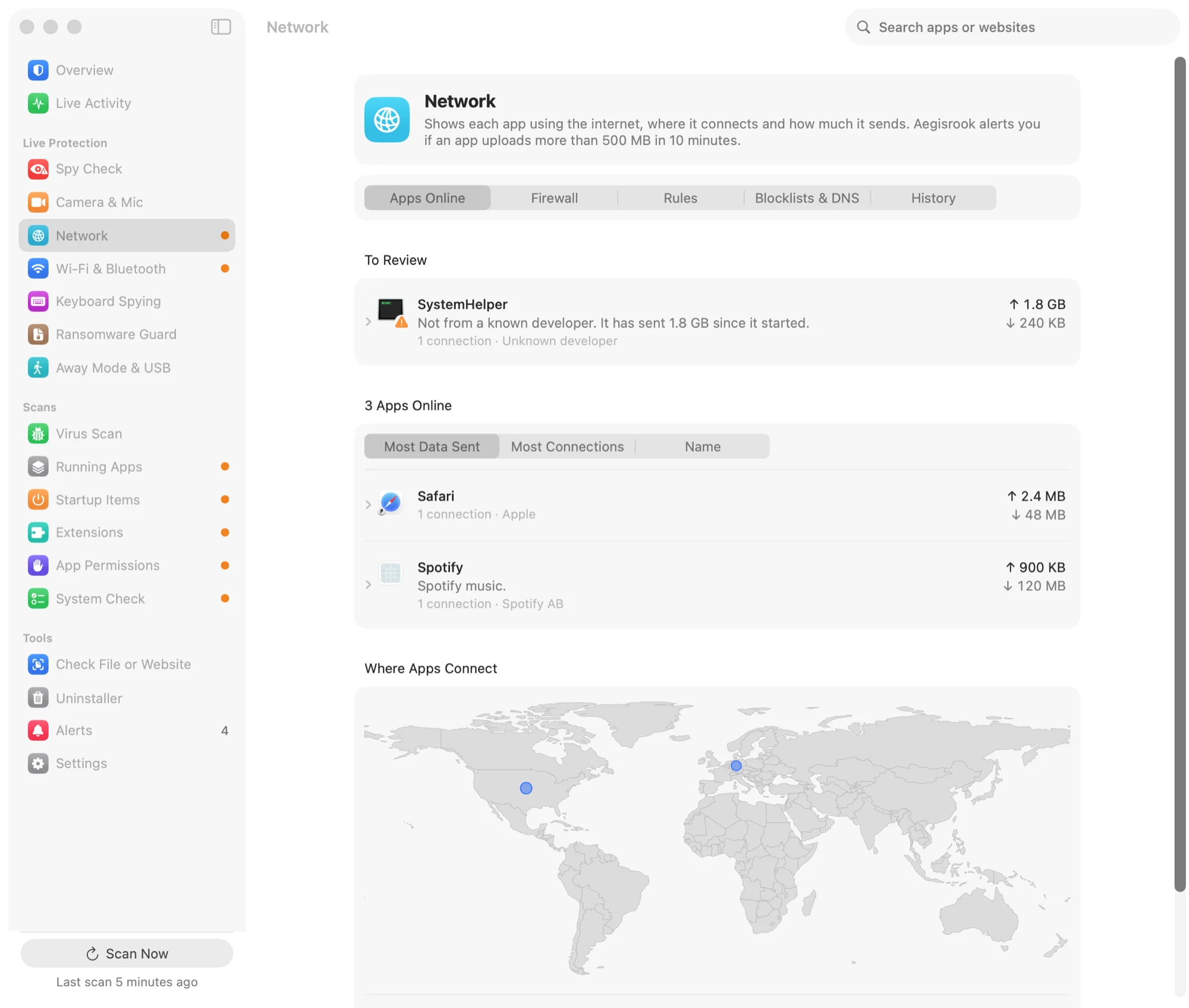
Everything your apps do online
Every open connection, named, measured and placed on a map.
Which apps are online
A live list of every app with an open connection, and what it's talking to — by name where there is one, by address where there isn't. Apps you've never seen connect before are the ones worth looking at, so they're marked.
How much each one sends
Data sent and received, per app, per hour. This is the number that matters when something is quietly uploading: a note-taking app sending 1.8 GB is a different thing from a backup tool doing the same.
Counted from the connections the firewall sees. Traffic that doesn't pass through it isn't included — see below.
Where your apps connect
Each connection is placed on a map by looking up the address in an offline location database, so a server in a country you've no dealings with stands out. The lookup happens on your Mac; no address is sent anywhere to resolve it.
Address-to-country data is approximate, and a server's location is not its owner's location. Most large services route through whichever data centre is nearest, so an unfamiliar country is a reason to look, not a finding.
What happened earlier
Usage by app and by hour, kept so you can answer "what was it doing at two in the morning" after the fact. Blocked connections are listed separately, and the whole history exports to CSV.
Nothing new connects without you
The first time an app tries to reach the internet, Aegisrook stops it and asks. The alert names the app, says who signed it, and says what it's trying to reach. You answer once and it remembers.
A rule can cover everything an app does, or just one website, port or address — so a program can be allowed to check for updates and nothing else.
Compared with built-in and third-party tools
Each tool covers part of this. None covers all of it.
Activity Monitor
Its Network tab shows bytes sent and received per process, and that's all. It won't tell you which server, which country, or what happened an hour ago, and it can't stop anything. It's a meter, not a monitor.
The macOS firewall
In System Settings, and worth having on — but it filters incoming connections. It does not ask about, show, or block what your apps send out, which is the direction that matters once something is already running.
Dedicated firewall apps
They handle the outgoing part, and the best of them go deeper on the network than Aegisrook does. They don't cover startup items, the camera and mic, permissions or ransomware, so you'd need a separate app for each.
Aegisrook
The outgoing prompt, plus the map, per-app usage, history and export. The same app also covers startup items, permissions, the camera and the rest.
Limitations
Some network traffic is outside what any app firewall can see.
Some Apple traffic
Parts of macOS don't pass through any third-party network filter, Aegisrook's included. Those connections won't appear.
What's inside the connection
Traffic is encrypted, and Aegisrook does not break that open. It can tell you an app sent 1.8 GB to a particular server. It cannot tell you what was in it.
Whether a connection is bad
It shows you who, where and how much. Most unfamiliar connections are a content network or an analytics service doing something ordinary, and the app says so rather than implying otherwise.
Traffic from another device
This watches your Mac. It isn't a router or a network-wide monitor, so it says nothing about your phone or anything else on your Wi-Fi.
Good to know
Needs approval once
macOS requires you to approve any app that filters network connections, and it asks twice. The guide inside the app shows which button to click.
Does it slow things down?
It's the same kind of system extension Apple's own tools use. Connections are checked as they open, not re-checked continuously.
Nothing leaves your Mac
The location lookup is an offline database. There's no account, and no record of what your apps connect to is sent anywhere. See privacy.
See where your apps connect
Pay once and keep it for good.
Not for you? Get a full refund within 30 days.